Content Menu
● Understanding SMT to DIP Adapter PCB
● Tools and Materials Needed
● Step-by-Step Guide to Soldering an SMD Chip onto a DIP Adapter PCB
>> 1. Preparing the SMT to DIP Adapter PCB
>> 2. Applying Solder to One Pad
>> 3. Positioning the SMD Chip
>> 4. Tack Soldering the First Pin
>> 5. Soldering Remaining Pins
>> 6. Inspecting and Fixing Solder Bridges
>> 7. Soldering the DIP Header Pins
>> 8. Cleaning the Assembly
● Advanced Techniques for Soldering SMT to DIP Adapter PCBs
● Common Challenges and How to Overcome Them
● Testing and Verification After Soldering
● Benefits of Using SMT to DIP Adapter PCBs
● Conclusion
● FAQ
>> 1. What is an SMT to DIP adapter PCB?
>> 2. Can I solder any SMD chip onto a DIP adapter PCB?
>> 3. What soldering iron tip is best for SMT to DIP adapter work?
>> 4. How do I avoid solder bridges when soldering an SMD chip?
>> 5. Is it necessary to clean the PCB after soldering?
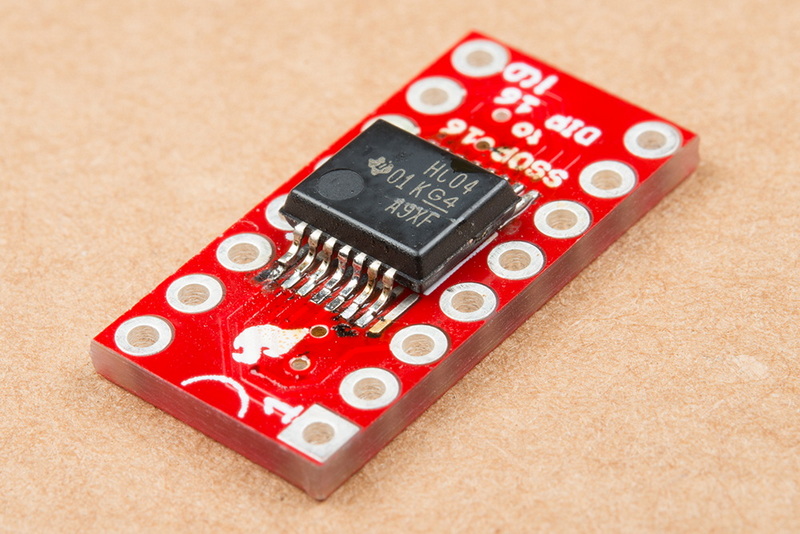
Soldering a surface-mount device (SMD) chip onto a dual in-line package (DIP) adapter PCB is a valuable skill for electronics enthusiasts and professionals alike. It allows you to interface small, compact SMD chips with breadboards or through-hole circuits that only accept DIP packages. This article will guide you through the entire process of soldering an SMD chip onto an SMT to DIP adapter PCB, covering preparation, tools, techniques, and tips to ensure a reliable and neat connection.
Understanding SMT to DIP Adapter PCB
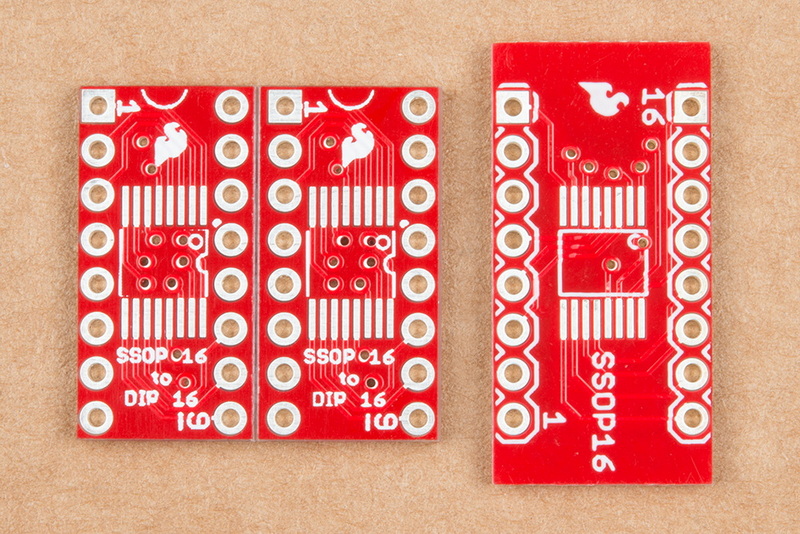
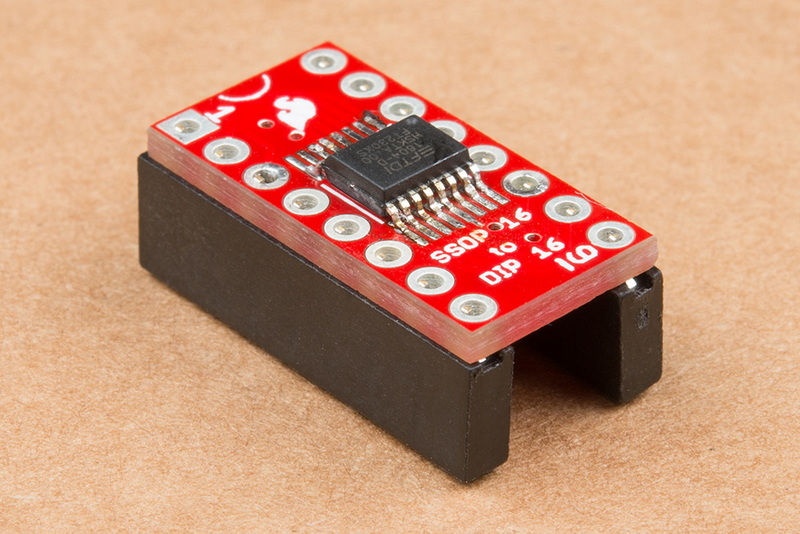
An SMT to DIP adapter PCB is a small printed circuit board designed to convert the footprint of an SMD chip into a DIP format. This adapter has surface-mount pads on one side where the SMD chip is soldered, and through-hole pins on the other side that fit into standard DIP sockets or breadboards. These adapters are essential when you want to prototype or test SMD components without specialized surface-mount equipment.
The SMT to DIP adapter PCB bridges the gap between modern miniaturized components and traditional prototyping methods. Many hobbyists and engineers find it easier to work with DIP packages because they can be plugged directly into breadboards or standard sockets. Without such an adapter, using SMD chips in a prototyping environment can be challenging due to their tiny size and delicate pins.
Tools and Materials Needed
Before starting, gather the necessary tools and materials:
- SMT to DIP adapter PCB: Choose one compatible with your SMD chip package (e.g., SOIC, QFN, TSSOP).
- SMD chip: The surface-mount device you want to solder.
- Soldering iron with a fine tip: A 15-30W iron with a fine or modified tip is ideal for precision.
- Solder wire: Use thin solder wire (around 0.5mm diameter) with flux core.
- Flux: Additional flux helps improve solder flow and adhesion.
- Tweezers: Fine-point tweezers to handle and position the SMD chip.
- Magnifying glass or loupe: To inspect solder joints closely.
- Solder wick or desoldering braid: For fixing solder bridges.
- Solderless breadboard or jig: To hold the adapter PCB steady during soldering.
- Isopropyl alcohol and brush: For cleaning flux residue after soldering.
- Helping hands or PCB holder: Useful to stabilize your workpiece.
- Heat-resistant mat: To protect your workspace.
Having the right tools at hand will make the soldering process smoother and reduce the risk of damaging components or creating poor solder joints.
Step-by-Step Guide to Soldering an SMD Chip onto a DIP Adapter PCB
1. Preparing the SMT to DIP Adapter PCB
Start by cleaning the adapter PCB pads with isopropyl alcohol to remove any oils or contaminants. This ensures good solder wetting. Inspect the pads to confirm they are free from oxidation or damage. If the pads look dull or oxidized, a light scrub with a fiberglass pen or fine sandpaper can improve solderability.
2. Applying Solder to One Pad
Apply a small amount of solder to one pad on the adapter PCB, usually a corner pad. This creates a "tack" point that will hold the SMD chip in place during soldering. This step is crucial to prevent the chip from moving while you solder the other pins.
3. Positioning the SMD Chip
Using tweezers, carefully align the SMD chip so that its pins line up exactly with the pads on the SMT to DIP adapter PCB. The chip orientation is critical; check for pin 1 markings on both the chip and PCB silkscreen and align accordingly. Proper alignment avoids incorrect connections and potential damage to the chip.
4. Tack Soldering the First Pin
Heat the soldered pad with the soldering iron and gently press the corresponding pin of the SMD chip onto it. Once the solder melts, remove the heat and let the joint solidify. This tacks the chip down securely for further soldering. Double-check the alignment before proceeding.
5. Soldering Remaining Pins
Proceed to solder the other pins one by one. Touch the soldering iron tip to both the pin and the pad simultaneously, then feed a small amount of solder wire until the joint forms a smooth fillet. Avoid applying too much solder to prevent bridging adjacent pins. Move systematically from one pin to the next to maintain control.
6. Inspecting and Fixing Solder Bridges
After soldering all pins, inspect the joints under magnification. If you find any solder bridges (shorts between pins), use solder wick to carefully remove excess solder. Applying flux before using solder wick can make the process easier. Take your time to ensure no shorts remain, as these can cause circuit malfunction.
7. Soldering the DIP Header Pins
Insert the male header pins into a solderless breadboard to hold them straight. Place the SMT to DIP adapter PCB over the pins, ensuring alignment. Solder each header pin from the top side of the PCB, creating a solid connection for breadboard use. Make sure the pins are perpendicular to the PCB for easy insertion.
8. Cleaning the Assembly
Once all soldering is complete, clean the PCB with isopropyl alcohol and a brush to remove flux residue. This prevents corrosion and improves the appearance of the board. Let the board dry completely before testing or using it.
Advanced Techniques for Soldering SMT to DIP Adapter PCBs
For those seeking even better results or working with very small or complex SMD packages, consider these advanced techniques:
- Using a solder paste and hot air rework station: Instead of solder wire, apply solder paste to the pads, place the chip, and heat with a hot air station. This method can provide more uniform solder joints and reduce manual soldering errors.
- Pre-tinning the pads: Apply a thin layer of solder to all pads before positioning the chip, then heat each pin to flow the solder. This can speed up the process but requires careful control to avoid bridges.
- Using Kapton tape: To hold the chip in place temporarily if you don't have a tack solder joint.
- Microscope inspection: For very fine-pitch devices, a microscope can help identify subtle soldering defects.
- Reflow ovens: For batch soldering multiple SMT to DIP adapter PCBs, a reflow oven can automate the process efficiently.
Common Challenges and How to Overcome Them
- Misalignment of the chip: Tack solder one pin first, then adjust the chip before soldering the rest. Using a magnifying glass or microscope helps.
- Solder bridges: Use solder wick and flux to remove excess solder carefully. Avoid applying too much solder initially.
- Cold solder joints: Ensure the soldering iron is hot enough and heat both pad and pin simultaneously. A cold joint looks dull and may cause intermittent connections.
- Damaging the chip with excessive heat: Use the lowest effective temperature and avoid prolonged contact. Work quickly and efficiently.
- Handling tiny components: Use fine tweezers and steady hands. A PCB holder or helping hands tool can stabilize your work.
- Flux residue causing corrosion: Always clean the PCB after soldering with isopropyl alcohol.
Testing and Verification After Soldering
Once your SMD chip is soldered onto the SMT to DIP adapter PCB and the header pins are attached, it's important to verify the connections before integrating it into your project.
- Visual inspection: Use magnification to check for solder bridges, cold joints, or lifted pads.
- Continuity testing: Use a multimeter to check for shorts between adjacent pins and verify that each pin is properly connected to its corresponding DIP pin.
- Functional testing: If possible, power up the chip in a test circuit to ensure it operates as expected.
- Rework if necessary: If problems are found, use solder wick and flux to fix joints or replace the chip if damaged.
Benefits of Using SMT to DIP Adapter PCBs
- Prototyping convenience: Allows SMD chips to be used with breadboards and through-hole sockets.
- Cost-effective: Avoids the need for expensive surface-mount test equipment.
- Versatility: Supports a wide range of SMD packages.
- Learning tool: Helps beginners practice surface-mount soldering techniques.
- Repair and modification: Makes it easier to replace or upgrade SMD chips in existing designs.
Conclusion
Soldering an SMD chip onto an SMT to DIP adapter PCB is a practical skill that enables the use of compact surface-mount devices in through-hole prototyping environments. By carefully preparing the PCB, aligning the chip, and using proper soldering techniques, you can achieve reliable and clean connections. This process opens up many possibilities for experimenting with modern ICs and components that otherwise would be difficult to handle. With practice and attention to detail, soldering on SMT to DIP adapter PCBs becomes a straightforward and rewarding task.
Whether you are a hobbyist, student, or professional, mastering this technique expands your capability to work with a broader range of electronic components and enhances your prototyping flexibility.
FAQ
1. What is an SMT to DIP adapter PCB?
An SMT to DIP adapter PCB is a small board that converts surface-mount device footprints into dual in-line package pinouts, allowing SMD chips to be used with breadboards and through-hole circuits.
2. Can I solder any SMD chip onto a DIP adapter PCB?
You need to use an adapter PCB that matches the package type of your SMD chip, such as SOIC, QFN, or TSSOP. Using the correct adapter ensures proper pin alignment and ease of soldering.
3. What soldering iron tip is best for SMT to DIP adapter work?
A fine-point soldering iron tip is best for precision soldering of small SMD pins on the adapter PCB. Modifying a standard tip to be finer can also help.
4. How do I avoid solder bridges when soldering an SMD chip?
Use minimal solder, apply flux, and solder pins one at a time. Inspect joints under magnification and use solder wick to remove any accidental bridges.
5. Is it necessary to clean the PCB after soldering?
Yes, cleaning with isopropyl alcohol removes flux residue that can cause corrosion or affect circuit performance over time.


