Content Menu
● Understanding SMT to DIP Adapter PCBs
● Step 1: Gathering Requirements and Defining Specifications
● Step 2: Creating the SMT to DIP Adapter PCB SolidWorks Model
>> 2.1 Starting a New PCB Project
>> 2.2 Defining the PCB Outline
>> 2.3 Modeling SMT Pads
>> 2.4 Modeling DIP Pins and Holes
>> 2.5 Routing Traces (Optional in SolidWorks)
>> 2.6 Adding Mechanical Features
● Step 3: Exporting and Preparing for PCB Fabrication
● Step 4: Manufacturing and Assembly Considerations
● Step 5: Testing and Validation
● Tips for Designing SMT to DIP Adapter PCB SolidWorks Models
● Advantages of Using SMT to DIP Adapter PCBs
● Conclusion
● FAQ
>> 1. What is an SMT to DIP adapter PCB?
>> 2. Can I design SMT to DIP adapters entirely in SolidWorks?
>> 3. What SMT packages are commonly adapted to DIP?
>> 4. How do I ensure the SMT pads align correctly in the adapter?
>> 5. Are there ready-made SMT to DIP adapter PCB models available?
Designing an SMT to DIP adapter PCB in SolidWorks is a practical skill for electronics engineers and hobbyists who need to interface surface-mount technology (SMT) components with traditional through-hole DIP (Dual Inline Package) sockets or breadboards. This adapter bridges the gap between modern SMT packages and legacy prototyping or testing platforms, enabling seamless integration and experimentation.
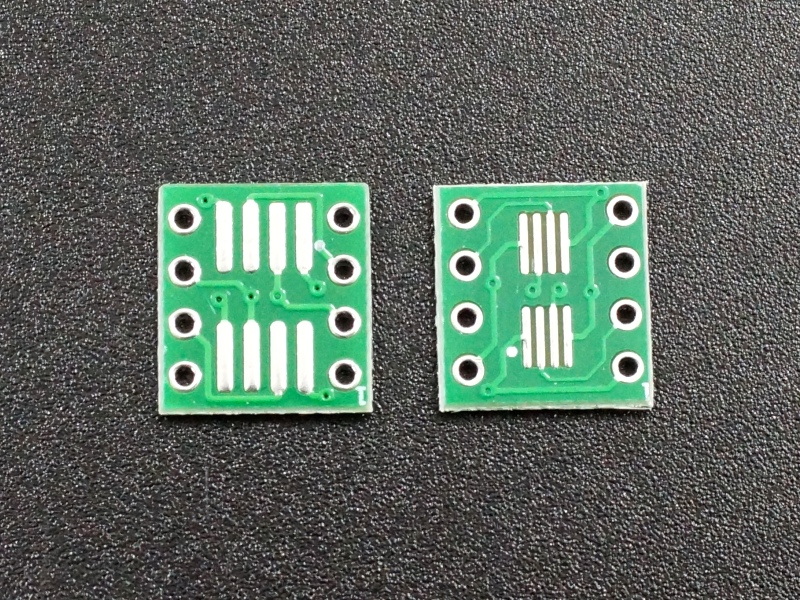
This comprehensive guide will walk you through the entire process of designing an SMT to DIP adapter PCB using SolidWorks, focusing on creating a precise and functional SMT to DIP adapter PCB SolidWorks model. We will cover the design considerations, SolidWorks modeling techniques, PCB layout, and manufacturing tips to help you achieve a professional-quality adapter.
Understanding SMT to DIP Adapter PCBs
Surface Mount Technology (SMT) components are designed to be soldered directly onto the surface of PCBs, while DIP components have leads that go through holes in the PCB. SMT to DIP adapters convert SMT packages like SOIC, TSSOP, or QFP into DIP footprints, allowing these components to be used on breadboards or through-hole prototyping boards.
Common reasons to design SMT to DIP adapter PCBs include:
- Prototyping SMT components on breadboards.
- Programming or testing SMT microcontrollers using DIP sockets.
- Saving cost by using SMT chips with existing DIP-based setups.
- Facilitating easier debugging and replacement of SMT parts.
The SMT to DIP adapter PCB SolidWorks model serves as a crucial step in visualizing and verifying the mechanical and electrical compatibility of the adapter before manufacturing. It helps ensure that the SMT pads align perfectly with the component leads and that the DIP pins fit correctly into sockets or breadboards.
Step 1: Gathering Requirements and Defining Specifications
Before starting your SMT to DIP adapter PCB SolidWorks model, define the key specifications:
- SMT Package Type: Identify the SMT package you want to adapt (e.g., SOIC-8, TSSOP-16).
- Pin Count: Number of pins on the SMT component.
- Pin Pitch: Distance between pins on the SMT package (commonly 0.5mm, 0.65mm, or 1.27mm).
- DIP Pin Pitch: Standard DIP pitch is 2.54mm (0.1 inch).
- Adapter Size: Keep the adapter compact but manageable for handling.
- Mounting Style: Choose whether the SMT component will be soldered on top or bottom side.
- Connectivity: Define the routing from SMT pads to DIP pins.
- Mechanical Features: Include mounting holes or alignment marks if needed.
- Board Thickness: Commonly 1.6mm, but can vary depending on mechanical requirements.
- Hole Diameter: For DIP pins, typically 0.8mm to 1mm to allow easy insertion.
Having these details helps you accurately model the adapter PCB in SolidWorks and ensures compatibility with both the SMT component and the DIP socket or breadboard.
Step 2: Creating the SMT to DIP Adapter PCB SolidWorks Model
SolidWorks is a powerful CAD tool for mechanical and PCB design. Although it is primarily mechanical CAD software, it can be used to create detailed PCB models, including SMT to DIP adapter PCBs.
2.1 Starting a New PCB Project
- Open SolidWorks and create a new part or assembly file.
- Set the units to millimeters for PCB design.
- Create a new sketch on the Top Plane to define the PCB outline.
2.2 Defining the PCB Outline
- Draw a rectangle representing the PCB dimensions based on your adapter size.
- Typical adapters are small, e.g., 20mm x 10mm, but adjust to fit your SMT package and DIP pins.
- Add fillets to corners if desired for better aesthetics and handling.
- Consider adding a small border around the pads to provide mechanical strength and space for solder mask.
2.3 Modeling SMT Pads
- Create sketches for SMT pads according to the SMT package footprint.
- Use precise dimensions for pad length, width, and spacing (pitch).
- Extrude these pads as thin features (e.g., 0.1mm thickness) on the PCB surface.
- Arrange pads in the correct layout matching the SMT component datasheet.
- For example, if designing for an SOIC-8 package, model eight rectangular pads spaced precisely at the standard pitch.
- Include solder mask openings around pads to facilitate soldering.
2.4 Modeling DIP Pins and Holes
- Sketch the DIP pin holes on the opposite side of the PCB.
- Standard DIP pin holes are 0.8mm to 1mm in diameter to accommodate DIP pins.
- Place holes with 2.54mm pitch in two parallel rows.
- Extrude cut the holes through the PCB thickness.
- Ensure the hole placement matches the DIP socket or breadboard footprint exactly.
- Add annular rings around holes to provide reliable solder joints.
2.5 Routing Traces (Optional in SolidWorks)
While SolidWorks is not specialized for PCB trace routing, you can model simple traces as extruded features connecting SMT pads to DIP holes for visualization.
- Use thin extruded features (e.g., 0.15mm thick and 0.5mm wide) to represent copper traces.
- Route traces logically to avoid crossing and maintain signal integrity.
- If complex routing is needed, export the PCB outline and pad positions to dedicated PCB software (e.g., Eagle, Altium) for detailed routing.
- SolidWorks can still be used to check mechanical clearances and component placement.
2.6 Adding Mechanical Features
- Add mounting holes if needed to secure the adapter in an enclosure or fixture.
- Include text or labels for pin numbering using engravings or silkscreen layers.
- Model chamfers or bevels on edges for better insertion into sockets.
- Add fiducials or alignment marks if the adapter will be used in automated assembly.
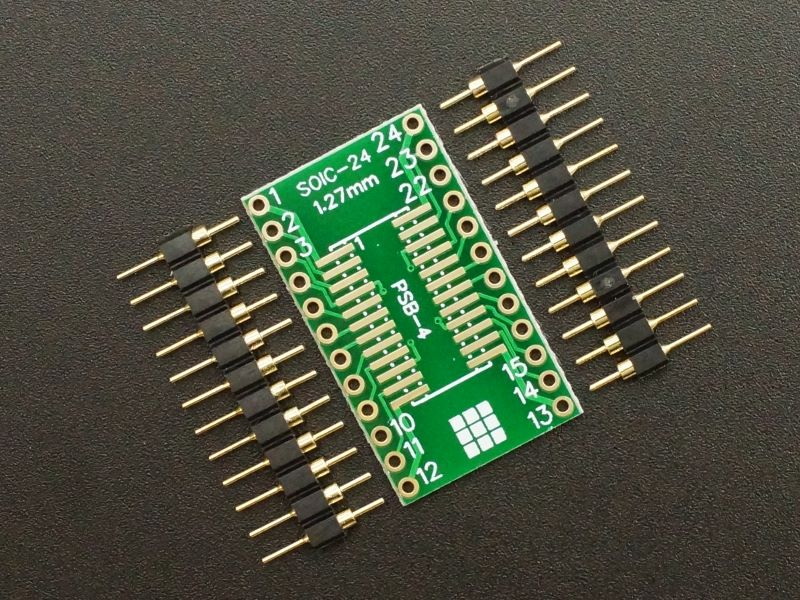
Step 3: Exporting and Preparing for PCB Fabrication
Once your SMT to DIP adapter PCB SolidWorks model is complete, you need to prepare it for manufacturing.
- Export the PCB outline and pad layouts as DXF or DWG files.
- Use these files to create Gerber files in PCB design software.
- Verify pad sizes, hole diameters, and overall dimensions match fabrication requirements.
- Generate drill files for the DIP holes.
- Include solder mask and silkscreen layers if applicable.
- Double-check the footprint alignment with the SMT component datasheet.
- If possible, create a 3D STEP model combining the PCB and SMT component for mechanical verification.
Step 4: Manufacturing and Assembly Considerations
- Choose PCB material (FR4 is common).
- Specify board thickness (typically 1.6mm).
- For SMT pads, ensure solder mask openings are correct for reliable soldering.
- Use plated through holes for DIP pins to enable soldering on both sides.
- During assembly, solder the SMT component onto the adapter pads.
- Then insert the DIP pins into the breadboard or socket.
- Inspect solder joints carefully to avoid shorts or cold joints.
- If the adapter will be used in a harsh environment, consider conformal coating for protection.
Step 5: Testing and Validation
After assembling the SMT to DIP adapter PCB:
- Perform continuity tests to ensure all pins connect correctly.
- Verify no shorts exist between adjacent pins.
- Test the SMT component functionality through the DIP interface.
- Check mechanical fit in the breadboard or socket.
- If issues arise, revisit the SolidWorks model to adjust pad sizes or hole placements.
Tips for Designing SMT to DIP Adapter PCB SolidWorks Models
- Accuracy is Key: Use exact dimensions from SMT component datasheets.
- Keep It Compact: Minimize adapter size to reduce parasitic effects and save space.
- Test Fit: If possible, 3D print the adapter model to check mechanical fit before fabrication.
- Pin Numbering: Clearly mark pin 1 to avoid assembly errors.
- Thermal Relief: Design pads with thermal relief patterns for easier soldering and heat dissipation.
- Standardize: Create templates for common SMT packages to speed up future designs.
- Consider Signal Integrity: For high-frequency signals, keep traces short and avoid unnecessary vias.
- Use Layer Colors: In SolidWorks, use different colors or layers to distinguish pads, holes, and traces for clarity.
- Documentation: Include detailed notes and dimensions in your SolidWorks drawings for manufacturing.
Advantages of Using SMT to DIP Adapter PCBs
- Enables prototyping SMT components on breadboards.
- Simplifies programming and testing of SMT microcontrollers.
- Saves cost by using cheaper SMT parts.
- Facilitates debugging and replacement.
- Allows use of legacy equipment with modern components.
- Enhances design flexibility and experimentation.
- Reduces time to market by enabling quick testing.
Conclusion
Designing an SMT to DIP adapter PCB in SolidWorks involves understanding the SMT package and DIP footprint, accurately modeling the PCB outline, pads, and holes, and preparing the design for manufacturing. Although SolidWorks is primarily a mechanical CAD tool, it can effectively create detailed SMT to DIP adapter PCB SolidWorks models that serve as a foundation for PCB fabrication and assembly.
By following the steps outlined-defining specifications, creating precise sketches and features, and preparing manufacturing files-you can produce functional SMT to DIP adapters that bridge modern SMT components with traditional prototyping platforms. This skill enhances your ability to prototype, test, and develop electronics projects involving diverse component packages.
With practice, you can create a library of SMT to DIP adapter PCB SolidWorks models for various packages, streamlining your workflow and enabling rapid prototyping. The combination of mechanical precision and electrical functionality in your designs will ensure reliable adapters that meet your project needs.
FAQ
1. What is an SMT to DIP adapter PCB?
An SMT to DIP adapter PCB converts surface-mount technology components into a dual inline package format, allowing SMT chips to be used on breadboards or DIP sockets designed for through-hole components.
2. Can I design SMT to DIP adapters entirely in SolidWorks?
Yes, you can create the PCB outline, pads, and holes in SolidWorks to build an SMT to DIP adapter PCB SolidWorks model. However, detailed trace routing is better done in dedicated PCB software.
3. What SMT packages are commonly adapted to DIP?
Common SMT packages adapted include SOIC, TSSOP, QFP, and SOT23. The adapter converts their fine pitch pads to standard 2.54mm DIP pin spacing.
4. How do I ensure the SMT pads align correctly in the adapter?
Use the SMT component's datasheet for exact pad dimensions and pitch. Model these precisely in your SolidWorks sketch to ensure proper alignment.
5. Are there ready-made SMT to DIP adapter PCB models available?
Yes, many open-source designs and libraries provide SMT to DIP adapter PCB SolidWorks models or PCB layouts for common packages, which can be customized for your needs.


